
RTC
在本章中,我们将学习 Luckfox Lume RTC 的时间读写与系统校时。
1. RTC
RTC(Real‑Time Clock,实时时钟)是嵌入式系统、微控制器中专用的硬件计时模块。该模块一般搭载独立后备电源(常见为纽扣电池),当设备主电源掉电断开后,依然可以独立持续运行、维持日期与时间计数。 凭借掉电保时的特性,RTC 可为设备提供稳定可靠的时间基准,广泛应用于日志数据打时间戳、定时唤醒、系统时钟同步、定时任务调度等对实时性有要求的业务场景。
2. RTC 测试(Shell)
2.1 查看 RTC 设备
在开发板执行:
ls -l /dev/rtc*
cat /sys/class/rtc/rtc0/name
dmesg | grep -i rtc
2.2 读写 RTC
Linux 系统中内置了 hwclock 工具,用于便捷地读取 RTC 硬件时钟提供的当前时间和日期。只需执行如下命令,即可展示 RTC 上的精确时间。
-
读取 RTC 时间:
hwclock --show指定 RTC 设备:
hwclock -f /dev/rtc0 --show -
设置 RTC 时间:
date -s "2026-09-02 12:00:00" # 先设置系统时间hwclock -f /dev/rtc0 --systohc #再将系统时间写入 RTC -
从 RTC 恢复系统时间:
hwclock -f /dev/rtc0 --hctosys
3. 读写 RTC(Python 程序)
-
完整代码:默认只读取 RTC;
write将系统时间写入 RTC,sync从 RTC 恢复系统时间。两种修改操作均在完成后读取 RTC,便于查看结果。#!/usr/bin/env python3import subprocessimport sysRTC_DEVICE = "/dev/rtc0"def run_hwclock(option):result = subprocess.run(["hwclock", "-f", RTC_DEVICE, "-u", option],capture_output=True, text=True, check=True)return result.stdout.strip()def get_rtc_time():rtc_time = run_hwclock("-r")if not rtc_time:raise RuntimeError("hwclock returned no time")print(f"RTC time: {rtc_time}")def set_rtc_from_system():run_hwclock("-w")print("RTC time set from system (UTC).")def sync_system_from_rtc():run_hwclock("-s")print("System time loaded from RTC (UTC).")def main():if len(sys.argv) > 2:print("Usage: RTC.py [read|write|sync]", file=sys.stderr)return 1mode = sys.argv[1] if len(sys.argv) == 2 else "read"if mode not in ("read", "write", "sync"):print("Usage: RTC.py [read|write|sync]", file=sys.stderr)return 1try:if mode == "write":set_rtc_from_system()elif mode == "sync":sync_system_from_rtc()get_rtc_time()except subprocess.CalledProcessError as error:message = error.stderr.strip() or f"hwclock exited with {error.returncode}"print(f"RTC error: {message}", file=sys.stderr)return 1except (OSError, RuntimeError) as error:print(f"RTC error: {error}", file=sys.stderr)return 1return 0if __name__ == "__main__":sys.exit(main()) -
读取 RTC 时间:
rtc_time = run_hwclock("-r")调用
hwclock -f /dev/rtc0 -u -r获取时间。check=True检查命令退出状态,执行失败或没有时间输出时报告错误,不继续后续操作。 -
将系统时间写入 RTC:
run_hwclock("-w")将当前系统时间按 UTC 写入 RTC。执行前先通过手动校时或 NTP 确认系统时间准确。
-
从 RTC 恢复系统时间:
run_hwclock("-s")把 RTC 时间同步到 Linux 系统时钟,需要 root 权限。
-
主程序:
if mode == "write":set_rtc_from_system()elif mode == "sync":sync_system_from_rtc()get_rtc_time()read只读;write和sync必须显式传入,避免运行示例时无意覆盖时钟。失败时程序返回非零退出码。 -
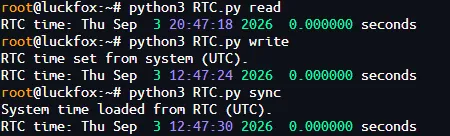
运行程序:
python3 RTC.py read # 读取系统时间python3 RTC.py write # 系统时间正确后,可执行写入python3 RTC.py sync # 需要从 RTC 恢复系统时间时执行date执行结果:
4. 读写 RTC(C 程序)
-
完整代码:
#define _POSIX_C_SOURCE 200809L#include <stdio.h>#include <stdlib.h>#include <string.h>#include <sys/wait.h>#define HWCLOCK "hwclock -f /dev/rtc0 -u "static int command_succeeded(int status){return status != -1 && WIFEXITED(status) && WEXITSTATUS(status) == 0;}static int get_rtc_time(void){char rtc_time[256];FILE *pipe = popen(HWCLOCK "-r", "r");if (!pipe) {perror("RTC read");return -1;}int got_time = fgets(rtc_time, sizeof(rtc_time), pipe) != NULL;int read_failed = ferror(pipe);int status = pclose(pipe);if (!got_time || read_failed || !command_succeeded(status)) {fprintf(stderr, "RTC error: hwclock read failed\n");return -1;}rtc_time[strcspn(rtc_time, "\r\n")] = '\0';if (rtc_time[0] == '\0') {fprintf(stderr, "RTC error: hwclock returned no time\n");return -1;}printf("RTC time: %s\n", rtc_time);return 0;}static int set_rtc_from_system(void){if (!command_succeeded(system(HWCLOCK "-w"))) {fprintf(stderr, "RTC error: cannot write system time to RTC\n");return -1;}puts("RTC time set from system (UTC).");fflush(stdout);return 0;}static int sync_system_from_rtc(void){if (!command_succeeded(system(HWCLOCK "-s"))) {fprintf(stderr, "RTC error: cannot set system time from RTC\n");return -1;}puts("System time loaded from RTC (UTC).");fflush(stdout);return 0;}int main(int argc, char *argv[]){if (argc > 2) {fprintf(stderr, "Usage: RTC [read|write|sync]\n");return EXIT_FAILURE;}const char *mode = argc == 2 ? argv[1] : "read";if (strcmp(mode, "read") == 0) {} else if (strcmp(mode, "write") == 0) {if (set_rtc_from_system() < 0)return EXIT_FAILURE;} else if (strcmp(mode, "sync") == 0) {if (sync_system_from_rtc() < 0)return EXIT_FAILURE;} else {fprintf(stderr, "Usage: RTC [read|write|sync]\n");return EXIT_FAILURE;}return get_rtc_time() < 0 ? EXIT_FAILURE : EXIT_SUCCESS;} -
读取 RTC 时间:
FILE *pipe = popen(HWCLOCK "-r", "r");通过
popen()获取hwclock的时间输出;检查fgets()和pclose()结果,只有读取成功且命令正常退出才显示时间。 -
将系统时间写入 RTC:
system(HWCLOCK "-w")将系统时间写入 RTC,使用
command_succeeded()检查命令是否成功,失败返回非零退出码。 -
从 RTC 恢复系统时间:
system(HWCLOCK "-s") -
主程序:
const char *mode = argc == 2 ? argv[1] : "read";默认只读。选择
write或sync后执行对应操作,再调用get_rtc_time()显示 RTC 时间。 -
交叉编译:使用 Lume 的 ARM 工具链。
export PATH=<Luckfox_Lume_SDK>/out/toolchain/gcc-linaro-11.3.1-2022.06-x86_64_arm-linux-gnueabihf/bin:$PATHarm-linux-gnueabihf-gcc -std=c11 -O2 -Wall -Wextra RTC.c -o RTC -
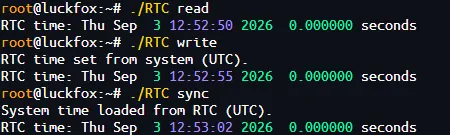
运行程序:
chmod +x RTC./RTC read # 读取系统时间./RTC write #系统时间正确后写入 RTC./RTC sync # 从有效的 RTC 时间恢复系统时间执行结果:
5. 系统校时
网络校时先校准 Linux 系统时间,再把准确时间写入 RTC。Lume 的 Buildroot SDK 已包含 BusyBox hwclock、NTP 软件包的 ntpd,使用 /etc/init.d/S49ntp 管理服务。
-
查看校时工具和服务:
command -v hwclockcommand -v ntpdls -l /etc/init.d/S49ntpps | grep -E 'ntpd|phc2sys|ptp4l' -
修改时区:
ln -snf /usr/share/zoneinfo/Asia/Shanghai /etc/localtimeunset TZroot@luckfox:~# date -RThu, 03 Sep 2026 21:12:51 +0800unset TZ取消当前 Shell 的环境变量覆盖。 -
网络校时并写入 RTC:
-
先停止 NTP 服务后台实例:
/etc/init.d/S49ntp stop -
执行一次前台校时,成功后将系统时间写入 RTC:
ntpd -g -q -n && hwclock -f /dev/rtc0 -u -w-g:允许首次校时修正较大的时间偏差。-q:完成一次校时后退出。-n:前台运行,便于查看输出。&&:只有校时命令成功退出后才写入 RTC。
-
执行结束后检查时间:
datehwclock -f /dev/rtc0 -u -r -
最后恢复 NTP 后台服务:
/etc/init.d/S49ntp start默认 SDK 已通过
S49ntp启动脚本在开机时启动服务,无需执行额外的 systemd 自启命令。
-